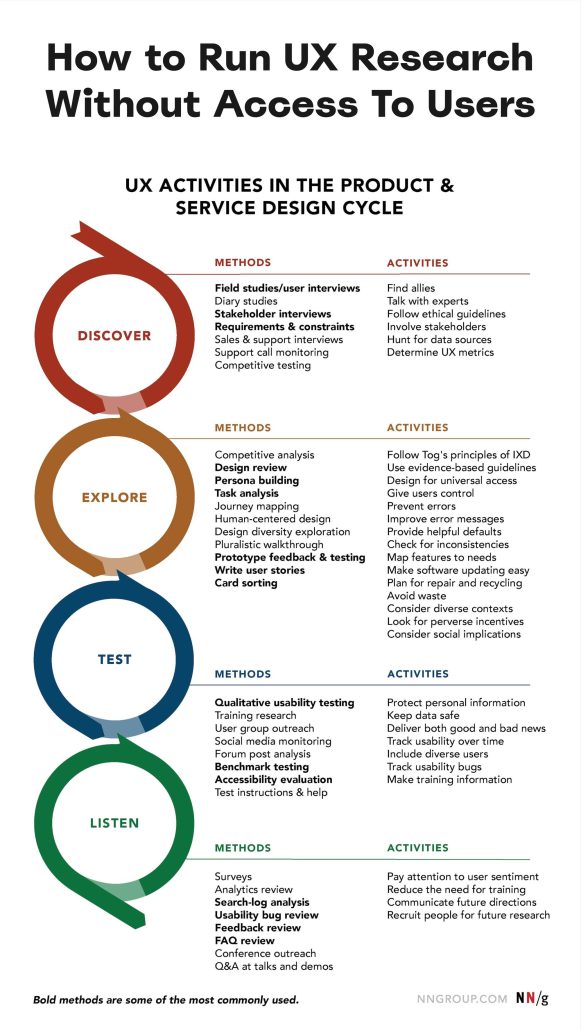
With practical techniques to avoid guesswork and gather insights if you can’t talk directly to users. Attached cheatsheet (with and without access to users) by Nielsen Norman Group.
🚫 Ask for reasons for no access to users: there might be none.
✅ Find colleagues who are the closest to your customers.
✅ Make friends with sales, customer success, support, QA.
✅ Convey your questions indirectly via your colleagues.
✅ Run proxy testing with users who understand the product.
✅ If you can’t get users to come to you, go where they are.
✅ Ask to observe or shadow customers at their workplace.
✅ Listen in to customer calls and interview call centre staff.
✅ Request access to analytics, CRM reports, call centre logs.
✅ Use Google Trends to find product-related search queries.
✅ Gather insights from search logs, Jira backlog, support tickets.
✅ Explore past/ongoing NPS and Voice-of-Customer programs.
✅ Study reviews, discussions, comments for your product/competitors.
✅ Map key themes and user sentiment on TrustPilot, AppStore etc.
✅ Recruit users via UserTesting, Maze, UserInterviews etc.
✅ Ask for small but steady commitments: 5 users × 30 mins, 1× month.
🚫 Avoid ad-hoc research: set up regular check-ins and timelines.
These techniques won’t always work, but they can help you get off the ground. Beware of drawing big conclusions from very little research. You need multiple sources to reduce the impact of assumptions and biases. As a very minimum, you need 5 users to discover patterns.
Ironically, as H Locke noted, the stakeholders who can’t give you time or resources to talk to users often are the first to demand evidence to support your design work. Tap into it and explain what you need. Ask for a small but steady commitment to gather evidence. Explain that you don’t need much to get started.
Sometimes the reason why companies are reluctant to grant access to users is simply the lack of trust. They don’t want to disturb relationships with big clients which is carefully maintained by the customer success team. They might feel that research is merely a technical detail that clients shouldn’t be bothered with.
Show that you care about that relationship. Show the value that your work brings. Explain that design without research is merely guesswork And designing without enough research is inherently flawed.
Once your impact becomes visible, it will be so much easier to get access to users that seemed to be almost impossible initially.
Useful resources:
- UX Research Cheat Sheet (attached image, PDF at the bottom), by Susan Farrell from NN/group
- What Can You Do When You Have No Access To Users?, by H Locke
- UX Research When You Can’t Talk To Users, by Chris Myhill