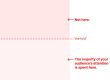
🚫 Avoid centered text if you can, at least for more than 3 lines of text.
✅ Font size, line height and line length are always connected.
✅ Longer lines need more line height, shorter lines need less.
✅ Use a type scale to choose a typographic hierarchy.
✅ Ideally, make the line height fluid and locked to the column width.
✅ If you have to use one line-height value for desktop/mobile, use 1.5.
Display text (for <h1>)
*****
✅ Default choice: 40px/2.5em for an <h1>.
✅ Desktop: go up until 64px/4em (max).
✅ Mobile: 32px/2em or smaller, since it uses up too much space.
✅ Larger headings work better with smaller line height — e.g. 1.1.
✅ Line height smaller than the type size might work better.
Body text
*****
✅ Default choice: 16px/1em (also browser’s default).
✅ Desktop: go up until 24px/1.5em (max).
✅ Mobile: Use the defaults, at times 10% smaller (min 14–15px)
✅ Desktop: keep 50–75 chars per line (25–37.5rem), line height 1.5–1.6.
✅ Mobile: usually 40–50 chars per line (20–25rem), line height 1.3–1.45.
Functional text (captions, nav)
*****
✅ Default choice: 12px/0.75em – 14px/0.875em.
✅ Desktop: go up until 16px/1em.
✅ Mobile: Don’t go below the defaults, it’s already very small.
The attributes of a typeface define how font size, line length and line height work together. Typically we would first choose the right typeface(s) and set a type scale for headings, body text and functional text.
Then, we achieve fluid typography with CSS clamp(), where we interpolate between min/max values for font size and line height, depending on container’s width (and hence line length).
There is no magic number that will always look right, but the guidelines above and the tools below hopefully will move the needle in the right direction. And when in doubt, make your font size larger.
Useful resources:
Line Length Revisited, by Mary Dyson
https://designregression.com/article/line-length-revisited-following-the-research
Modern Fluid Typography with CSS, by Adrian Bece
https://www.smashingmagazine.com/2022/01/modern-fluid-typography-css-clamp/
Useful tools:
Proportio: https://proportio.app
Utopia: https://utopia.fyi/type/calculator/
Fluid Type Scale: https://www.fluid-type-scale.com/
Type Scales (Figma, Adobe XD): https://typescale.io
Two typefaces, one for display and one for reading and use 4-5 font styles that differ in size and weight. I’ve usually seen using a module of 1.414 for wide screens and 1.125 for mobile devices gives the best result. https://typescale.com